
MCPvsAPIvsPlugins:howtoconnectAIagentstobusinessandfinancialdata
MCP, API, or plugin? Compare the three ways to connect an AI agent to business and financial data - what each is best for, when to use which, and how they work together.
MCP, API, or plugin? Compare the three ways to connect an AI agent to business and financial data - what each is best for, when to use which, and how they work together.
By
Bigdata.com team
·

MCP, an API, and a plugin are three ways to connect an AI agent to business and financial data, and each solves a different problem. Use an API for full programmatic control, MCP to plug data into any MCP-aware assistant like Claude, and a plugin for a turnkey, in-app experience. Most teams end up combining all three.
Key takeaways
API - full programmatic control; you build and own the integration.
MCP - plugs data straight into any MCP-aware assistant (like Claude), no glue code.
Plugin - a turnkey, in-product experience built for end users.
They’re layers, not rivals, as most teams use more than one at once.
Choose based on who’s actually consuming the data: developers (API), assistants and agents (MCP), end users (plugin).
What is an MCP connector?
An MCP connector is an implementation of the Model Context Protocol, an open standard that lets any MCP-aware AI assistant discover and call a data source’s tools directly, without a developer writing custom integration code for that specific assistant. Anthropic introduced MCP in November 2024, and by late 2025 the protocol had been contributed to the Linux Foundation’s Agentic AI Foundation, with client support from Claude, ChatGPT, and Gemini, which is the reason a single MCP connector now reaches most major assistants instead of just one.
In practice: an analyst asks Claude a question about a company. Instead of the analyst (or a developer, ahead of time) writing retrieval logic, Claude calls the MCP server sitting in front of the business and financial data, pulling the relevant filings, transcripts, or news, and citing them in its answer. The assistant decides what to fetch and when, based on the tools the MCP server exposes.
That’s the appeal of MCP for business and financial data specifically: it grounds an agent in live, structured financial content on demand, and it works the same way across any MCP client.
Bigdata.com’s own Remote MCP server is a concrete example. It connects Claude, ChatGPT, Cursor, and Microsoft Copilot (via OAuth for Claude and ChatGPT, or an API key for any other MCP client) to premium news, filings, earnings transcripts, and market intelligence through tools like bigdata_search, bigdata_company_tearsheet, and bigdata_sentiment_tearsheet, so an agent can pull a company brief or an earnings preview in one conversation instead of a custom pipeline. In Bigdata.com’s own comparative evaluation, Claude paired with the Bigdata MCP scored an overall average of 8.8 out of 10 versus 8.4 for Claude using web search alone, with the largest gains in source quality and attribution (9.5 vs. 7.5) and factual accuracy (9.0 vs. 7.5).
The tradeoff is that you’re working within whatever tools and resources the MCP server chooses to expose. It’s less granular than calling a raw API yourself, and you’re dependent on the server’s design decisions rather than your own.
What is a business and financial data API?
A business and financial data API is a programmatic endpoint (REST, GraphQL, or a WebSocket feed) that you call from your own code to retrieve data: prices, fundamentals, filings, transcripts, news, whatever the provider offers.
This is the option with maximum control. You decide exactly what to request, how to combine it with other sources, how to cache and paginate it, and how to feed it into whatever application or agent framework you’re building. If you want an LLM to use the data as a tool, you write the function-calling schema and the orchestration logic yourself.
Bigdata.com’s REST API family shows the range this layer typically covers: a Knowledge Graph API for resolving companies and securities, a Search Service API for retrieving relevant documents, a Research Agent API and Workflows API for orchestrating multi-step analysis, a Content API for indexing your own private documents, and a Structured Data API for prices, estimates, and earnings surprises, each managed through an API key and a usage dashboard on a developer platform.
The cost of that control is ownership. You maintain the integration through API versioning, handle auth and rate limits, and build the “agent-facing” layer on top if you want a model to use it autonomously. An API is the right foundation when you’re building custom software and need it to behave exactly the way you specify, but it’s the slowest path to a working agent, because everything in between is on you.
What is an AI plugin?
An AI plugin is a packaged connector that adds a data source to a specific AI product as a ready-to-use feature: a Claude connector, a ChatGPT plugin, or the equivalent inside another assistant. The vendor builds and maintains the integration; the end user just turns it on.
Plugins are built for reach, not flexibility. There’s no code to write and no infrastructure to run: someone opens the assistant, enables the connector, and starts asking questions about the business and financial data behind it. That makes plugins the fastest way to put data in front of a large, often non-technical audience.
Bigdata.com’s own Bigdata plugin skill is a good example of this layer in practice. Rather than an analyst crafting a fresh prompt every time, the skill walks the agent through the same repeatable research-and-writing process on each run — turning out standardized company briefs, earnings previews, and risk assessments across a whole portfolio, with none of the underlying MCP tool calls or API requests visible to the end user.
The tradeoff is that you’re building inside someone else’s surface. You get whatever level of customization the host product’s plugin framework allows, and you’re limited to the assistants that support it. A plugin is the right layer when the goal is a turnkey experience for end users, not a piece of infrastructure for developers to build on.
MCP vs API vs plugin: which should you use, and when?
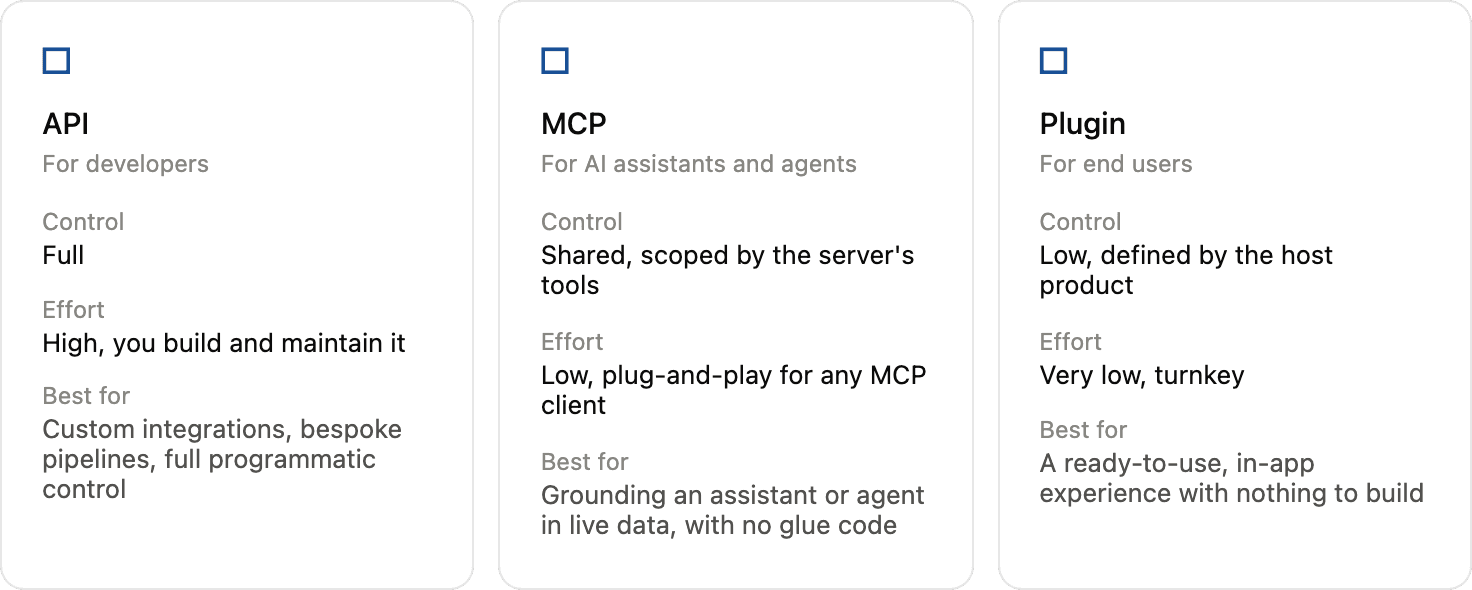
Here’s the practical side of the MCP vs API vs plugin question, broken down by control, effort, and who’s on the other end.
The fastest way to choose is to ask who’s actually consuming the data. If it’s a developer building custom software, use the API - you get full control, and you’re going to need it. If it’s an assistant or agent that should reason over live business and financial data with minimal setup, use MCP - it grounds the model without a custom integration. If it’s an end user who wants the data inside a chat app they already use, without any engineering effort, ship a plugin.
None of the three is strictly “better”, as they sit at different layers and serve different consumers of the same underlying data.
Can you combine them?
Yes, and most mature setups do. A common pattern: the API sits underneath as the source of truth, exposing the full breadth of the data. An MCP server wraps a curated set of that API’s capabilities as tools an agent can call, so any MCP-aware assistant can ground itself in the data without custom code. A plugin then packages that same connectivity as a one-click feature inside a specific assistant, for the end users who just want the answer.
That layering is why the three aren’t really competitors. A developer might use the API directly to build a proprietary research tool, while the same underlying business and financial data reaches an analyst through an MCP-connected agent, and reaches a less technical stakeholder through a plugin inside the AI product they already have open. One data layer, three ways in: that’s the real answer to MCP vs API vs plugin: it’s rarely either/or.
MCP, an API, and a plugin are three ways to connect an AI agent to business and financial data, and each solves a different problem. Use an API for full programmatic control, MCP to plug data into any MCP-aware assistant like Claude, and a plugin for a turnkey, in-app experience. Most teams end up combining all three.
Key takeaways
API - full programmatic control; you build and own the integration.
MCP - plugs data straight into any MCP-aware assistant (like Claude), no glue code.
Plugin - a turnkey, in-product experience built for end users.
They’re layers, not rivals, as most teams use more than one at once.
Choose based on who’s actually consuming the data: developers (API), assistants and agents (MCP), end users (plugin).
What is an MCP connector?
An MCP connector is an implementation of the Model Context Protocol, an open standard that lets any MCP-aware AI assistant discover and call a data source’s tools directly, without a developer writing custom integration code for that specific assistant. Anthropic introduced MCP in November 2024, and by late 2025 the protocol had been contributed to the Linux Foundation’s Agentic AI Foundation, with client support from Claude, ChatGPT, and Gemini, which is the reason a single MCP connector now reaches most major assistants instead of just one.
In practice: an analyst asks Claude a question about a company. Instead of the analyst (or a developer, ahead of time) writing retrieval logic, Claude calls the MCP server sitting in front of the business and financial data, pulling the relevant filings, transcripts, or news, and citing them in its answer. The assistant decides what to fetch and when, based on the tools the MCP server exposes.
That’s the appeal of MCP for business and financial data specifically: it grounds an agent in live, structured financial content on demand, and it works the same way across any MCP client.
Bigdata.com’s own Remote MCP server is a concrete example. It connects Claude, ChatGPT, Cursor, and Microsoft Copilot (via OAuth for Claude and ChatGPT, or an API key for any other MCP client) to premium news, filings, earnings transcripts, and market intelligence through tools like bigdata_search, bigdata_company_tearsheet, and bigdata_sentiment_tearsheet, so an agent can pull a company brief or an earnings preview in one conversation instead of a custom pipeline. In Bigdata.com’s own comparative evaluation, Claude paired with the Bigdata MCP scored an overall average of 8.8 out of 10 versus 8.4 for Claude using web search alone, with the largest gains in source quality and attribution (9.5 vs. 7.5) and factual accuracy (9.0 vs. 7.5).
The tradeoff is that you’re working within whatever tools and resources the MCP server chooses to expose. It’s less granular than calling a raw API yourself, and you’re dependent on the server’s design decisions rather than your own.
What is a business and financial data API?
A business and financial data API is a programmatic endpoint (REST, GraphQL, or a WebSocket feed) that you call from your own code to retrieve data: prices, fundamentals, filings, transcripts, news, whatever the provider offers.
This is the option with maximum control. You decide exactly what to request, how to combine it with other sources, how to cache and paginate it, and how to feed it into whatever application or agent framework you’re building. If you want an LLM to use the data as a tool, you write the function-calling schema and the orchestration logic yourself.
Bigdata.com’s REST API family shows the range this layer typically covers: a Knowledge Graph API for resolving companies and securities, a Search Service API for retrieving relevant documents, a Research Agent API and Workflows API for orchestrating multi-step analysis, a Content API for indexing your own private documents, and a Structured Data API for prices, estimates, and earnings surprises, each managed through an API key and a usage dashboard on a developer platform.
The cost of that control is ownership. You maintain the integration through API versioning, handle auth and rate limits, and build the “agent-facing” layer on top if you want a model to use it autonomously. An API is the right foundation when you’re building custom software and need it to behave exactly the way you specify, but it’s the slowest path to a working agent, because everything in between is on you.
What is an AI plugin?
An AI plugin is a packaged connector that adds a data source to a specific AI product as a ready-to-use feature: a Claude connector, a ChatGPT plugin, or the equivalent inside another assistant. The vendor builds and maintains the integration; the end user just turns it on.
Plugins are built for reach, not flexibility. There’s no code to write and no infrastructure to run: someone opens the assistant, enables the connector, and starts asking questions about the business and financial data behind it. That makes plugins the fastest way to put data in front of a large, often non-technical audience.
Bigdata.com’s own Bigdata plugin skill is a good example of this layer in practice. Rather than an analyst crafting a fresh prompt every time, the skill walks the agent through the same repeatable research-and-writing process on each run — turning out standardized company briefs, earnings previews, and risk assessments across a whole portfolio, with none of the underlying MCP tool calls or API requests visible to the end user.
The tradeoff is that you’re building inside someone else’s surface. You get whatever level of customization the host product’s plugin framework allows, and you’re limited to the assistants that support it. A plugin is the right layer when the goal is a turnkey experience for end users, not a piece of infrastructure for developers to build on.
MCP vs API vs plugin: which should you use, and when?
Here’s the practical side of the MCP vs API vs plugin question, broken down by control, effort, and who’s on the other end.
The fastest way to choose is to ask who’s actually consuming the data. If it’s a developer building custom software, use the API - you get full control, and you’re going to need it. If it’s an assistant or agent that should reason over live business and financial data with minimal setup, use MCP - it grounds the model without a custom integration. If it’s an end user who wants the data inside a chat app they already use, without any engineering effort, ship a plugin.
None of the three is strictly “better”, as they sit at different layers and serve different consumers of the same underlying data.
Can you combine them?
Yes, and most mature setups do. A common pattern: the API sits underneath as the source of truth, exposing the full breadth of the data. An MCP server wraps a curated set of that API’s capabilities as tools an agent can call, so any MCP-aware assistant can ground itself in the data without custom code. A plugin then packages that same connectivity as a one-click feature inside a specific assistant, for the end users who just want the answer.
That layering is why the three aren’t really competitors. A developer might use the API directly to build a proprietary research tool, while the same underlying business and financial data reaches an analyst through an MCP-connected agent, and reaches a less technical stakeholder through a plugin inside the AI product they already have open. One data layer, three ways in: that’s the real answer to MCP vs API vs plugin: it’s rarely either/or.
Frequently asked questions
An implementation of the Model Context Protocol that lets any MCP-aware AI assistant call a data source's tools directly, without custom integration code for that assistant.
A programmatic endpoint you call from your own code to retrieve business and financial data. It offers maximum control and flexibility, but you build and maintain the integration yourself.
A packaged connector that adds a data source to a specific AI product as a ready-to-use feature for end users, maintained by the vendor rather than the user.
Use an API for custom builds that need full control, MCP to ground an assistant or agent with no glue code, and a plugin for a turnkey, in-app experience for end users.
Yes, and most teams do. The API provides the underlying data, MCP exposes it to agents, and a plugin packages it for end users, all over the same data layer.



Developers
© 2026 Bigdata.com by RavenPack. All rights reserved.
Developers
© 2026 Bigdata.com by RavenPack. All rights reserved.