
HowtoturnyouremailsintoAI-searchableintelligencewiththeBigdataInboxConnector
The Bigdata Inbox Connector turns your inbound emails (broker notes, newsletters, analyst commentary) into structured, AI-searchable intelligence. Read on to find out how to set it up in four steps and how to leverage your indexed email archive inside Claude.
The Bigdata Inbox Connector turns your inbound emails (broker notes, newsletters, analyst commentary) into structured, AI-searchable intelligence. Read on to find out how to set it up in four steps and how to leverage your indexed email archive inside Claude.
By
Victor Pimentel Naranjo, Senior Product Manager and Team Lead
·

Somewhere in an analyst’s inbox right now there is a note with a thesis that changes the picture on a position. It arrived this morning, it was skimmed and it won’t be found again.
This is, above all, an infrastructure problem, and almost no one is treating it like one. Firms spend heavily on research platforms, data vendors, and AI tooling. But the highest-signal intelligence (research, analyst commentary, curated newsletters, proprietary client updates) arrives through a channel that was never designed for institutional knowledge: email.
It lands, it gets read, maybe forwarded. Then it disappears into personal inboxes that no search system, no AI agent, and no workflow can see.
Teams compensate with workarounds: copying paragraphs into documents, maintaining personal tagging systems, summarising threads in Slack and Teams. These systems are fragile, as they depend on individuals and don’t scale. And critically, they don’t compound.
The content already exists. The subscriptions are already paid for. The intelligence is already arriving, it just isn’t structurally integrated. That’s the entire bottleneck, so that’s where we started.
What is the Bigdata Inbox Connector?
The Inbox Connector does something deceptively simple: it turns inbound research email into structured, indexed, AI-accessible intelligence. It is the first release in Bigdata’s Connectors Suite, a roadmap of integrations designed to make every high-signal institutional content source pluggable into one system.
Once your emails are processed and indexed, they don’t sit in storage, they become part of your reasoning layer. When you run a search, build a workflow, prompt your research agent, or trigger MCP (Model Context Protocol), your private inbound intelligence is included alongside 30,000+ curated sources powered by RavenPack’s 20+ year archive. The marginal value of every newsletter subscription, feed, and analyst update you already pay for goes up, because the insight compounds instead of disappearing.
Think about what that means structurally. Your proprietary email intelligence, the morning note your broker sent at 7am, the thematic newsletter from that analyst you trust, is now searchable in the same system as millions of financial documents, earnings transcripts, SEC filings, and real-time news. Signals that used to live and die in an inbox now have permanence, structure, and reach.
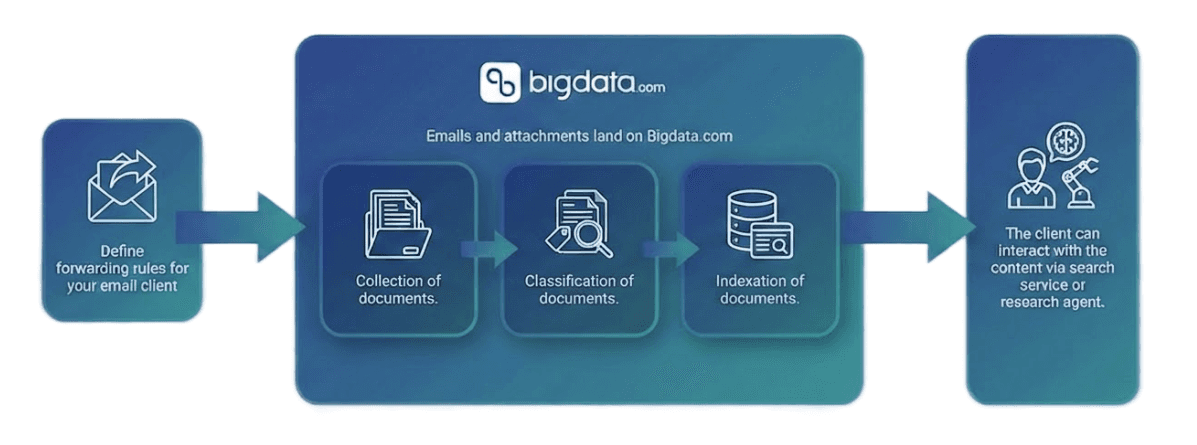
How to set up your Data Inbox in four steps
Setup requires no IT dependency, no complex integrations, and no change to how you currently receive research.
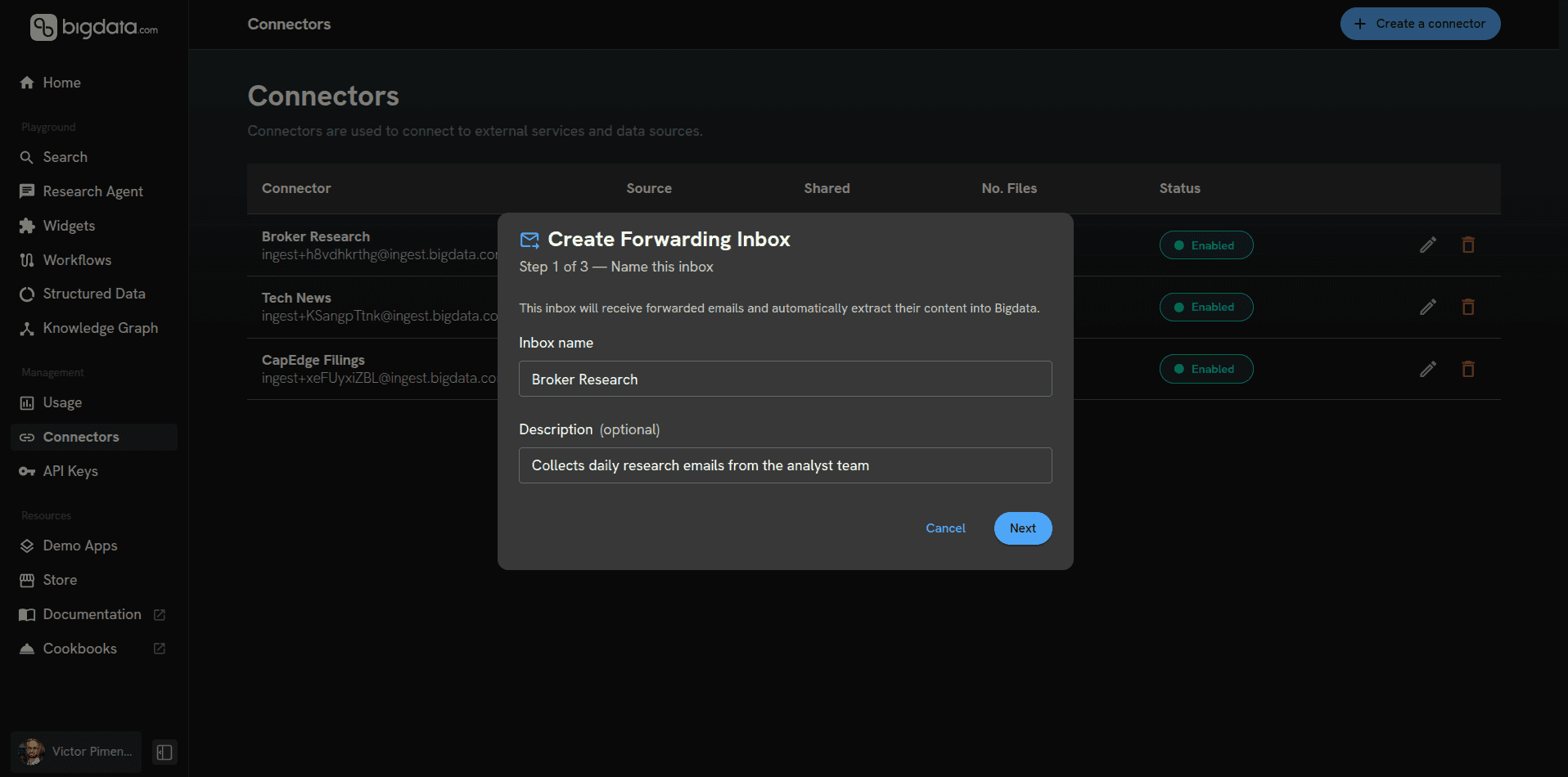
1. Go to platform.bigdata.com/connectors, click “Create a connector”, and select Email Inbox as your content source. Give it a name and, optionally, a description.

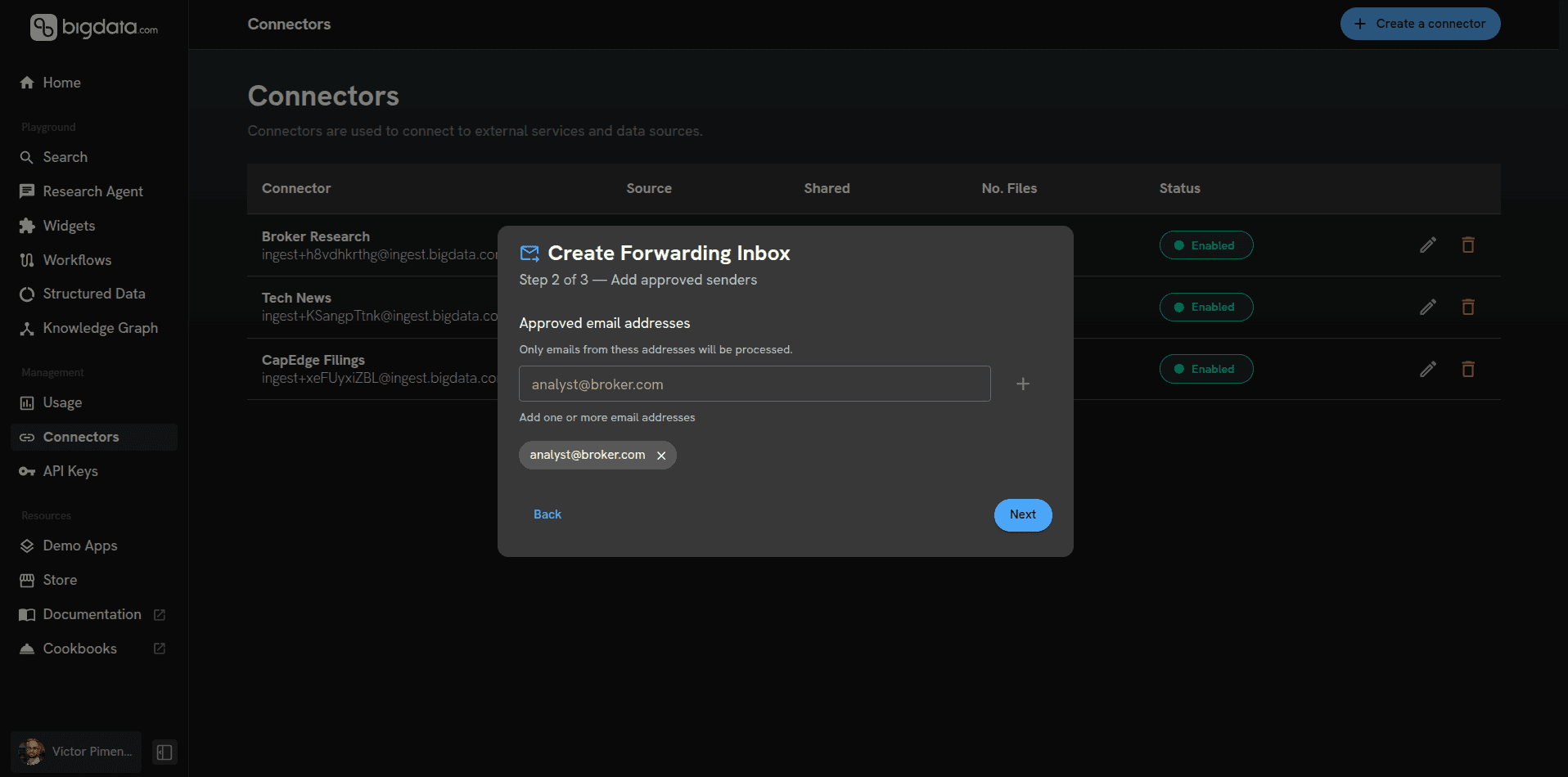
2. Define your approved senders. Enter the email addresses you want whitelisted for processing. This keeps your archive clean and prevents undesired content from being indexed. Add colleagues here if you want to build a shared research environment from the start.
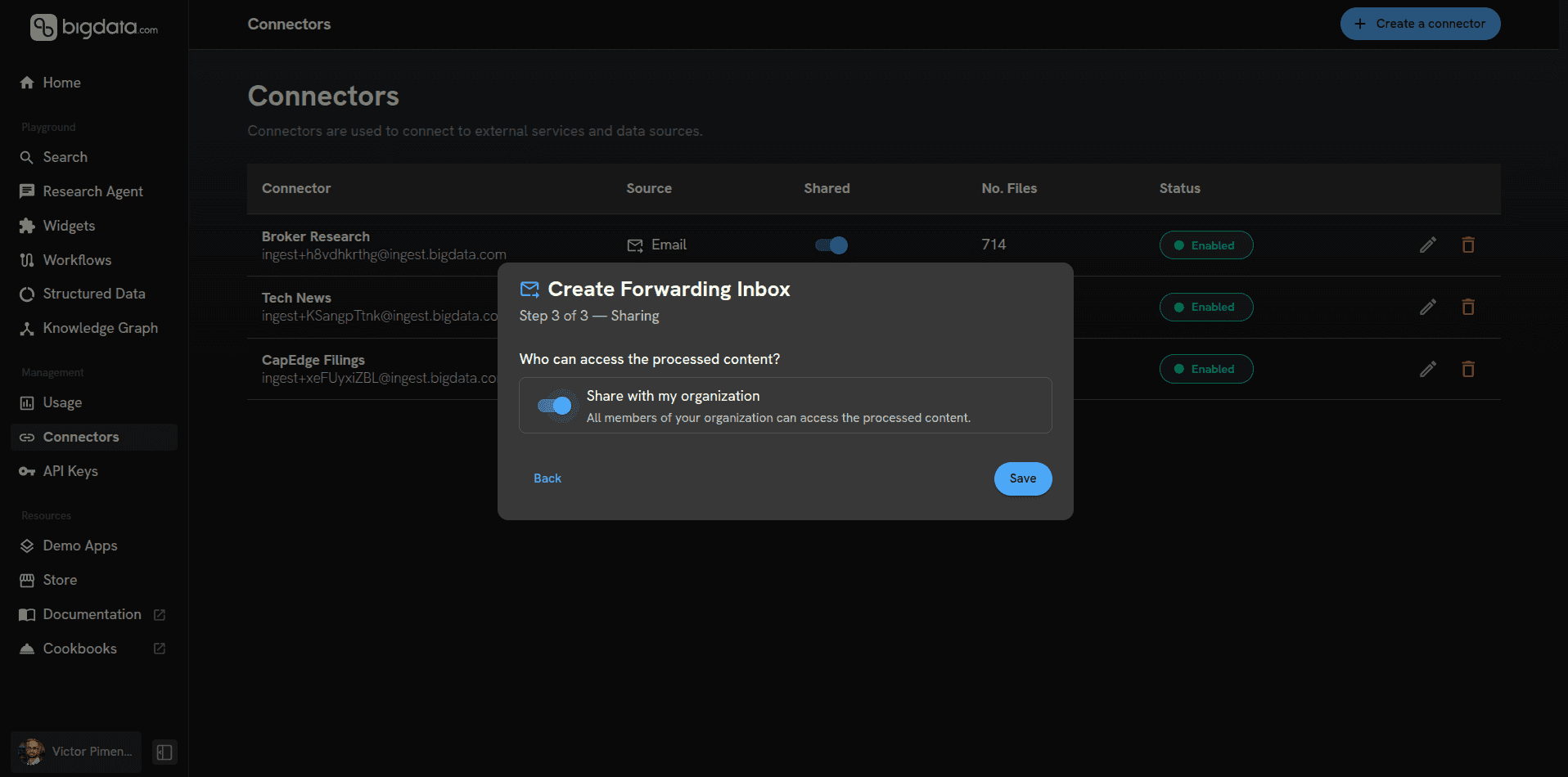
3. Set your access permissions. Decide whether the indexed content is private to you or shared across your organisation. Sharing means content is processed once for the whole team: no duplicate processing, no wasted credits.
4. You’re done. Once the setup is complete, you receive your dedicated Bigdata-managed inbox. Set an auto-forward rule from your existing email client, and from that point on every forwarded email is parsed, extracted, and indexed automatically.
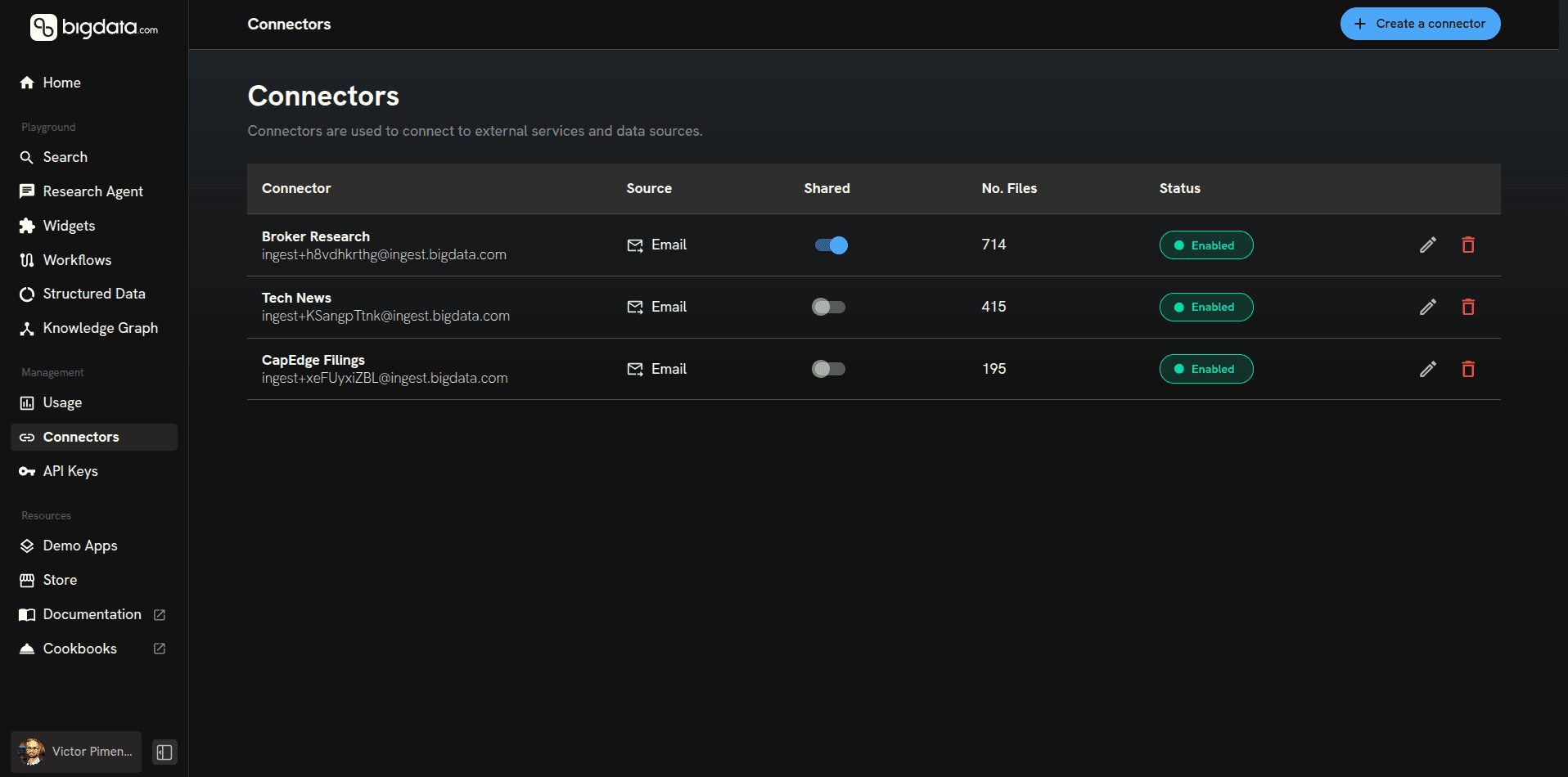
Your AI just got access to your proprietary signal. This is where the impact becomes structural.
Previously, your AI could see web content. Now, with Bigdata, it has access to high-quality assets powered by RavenPack and your proprietary content. That shift reduces blind spots, strengthens signal detection, and accelerates ramp-up on emerging topics. What was once passive becomes active. What was once siloed becomes institutional.
To put this to the test, I set up an auto-forward rule in my email client and pointed my newsletters at my Bigdata inbox. I also bulk-forwarded my historical archive, and the processing pipeline handled all of it automatically.
One detail worth highlighting: we extract EML metadata (senders, recipients, original timestamps) during ingestion, which means your archive is point-in-time accurate. You’re not just getting content, you’re getting content with provenance, which matters the moment you start doing any kind of longitudinal analysis or attribution.
Once processing is complete, you have many ways of interacting with your email content - here’s an exciting one.
Connect Bigdata to Claude so you can chat with you entire inbox and 1 billion financial docs
Bigdata.com is an official MCP connector for Claude. Connect it once through Claude Settings > Connectors, and Claude gains direct access to the full Bigdata intelligence layer, including your indexed email content.
What Claude can draw on once connected:
Over 1 billion financial documents: fundamentals, filings, earnings transcripts, and premium news
Real-time news feeds updated continuously across global markets
20+ years of archive depth, purpose-built for financial search and retrieval
Your proprietary inbound content, indexed and searchable alongside all of the above
Premium source attribution on every claim: named source, date, and URL
In controlled evaluations across 32 reports and 8 standardized financial research tasks, Claude grounded with Bigdata outperformed Claude with standard web search on every metric, with grounding quality seeing the largest single jump: +21 percentage points.
The practical difference for research teams is significant. Instead of context-switching between Claude and your data sources to verify claims, the connector means you stay in the conversation. And now, your forwarded newsletters and broker notes are part of what Claude reasons from.
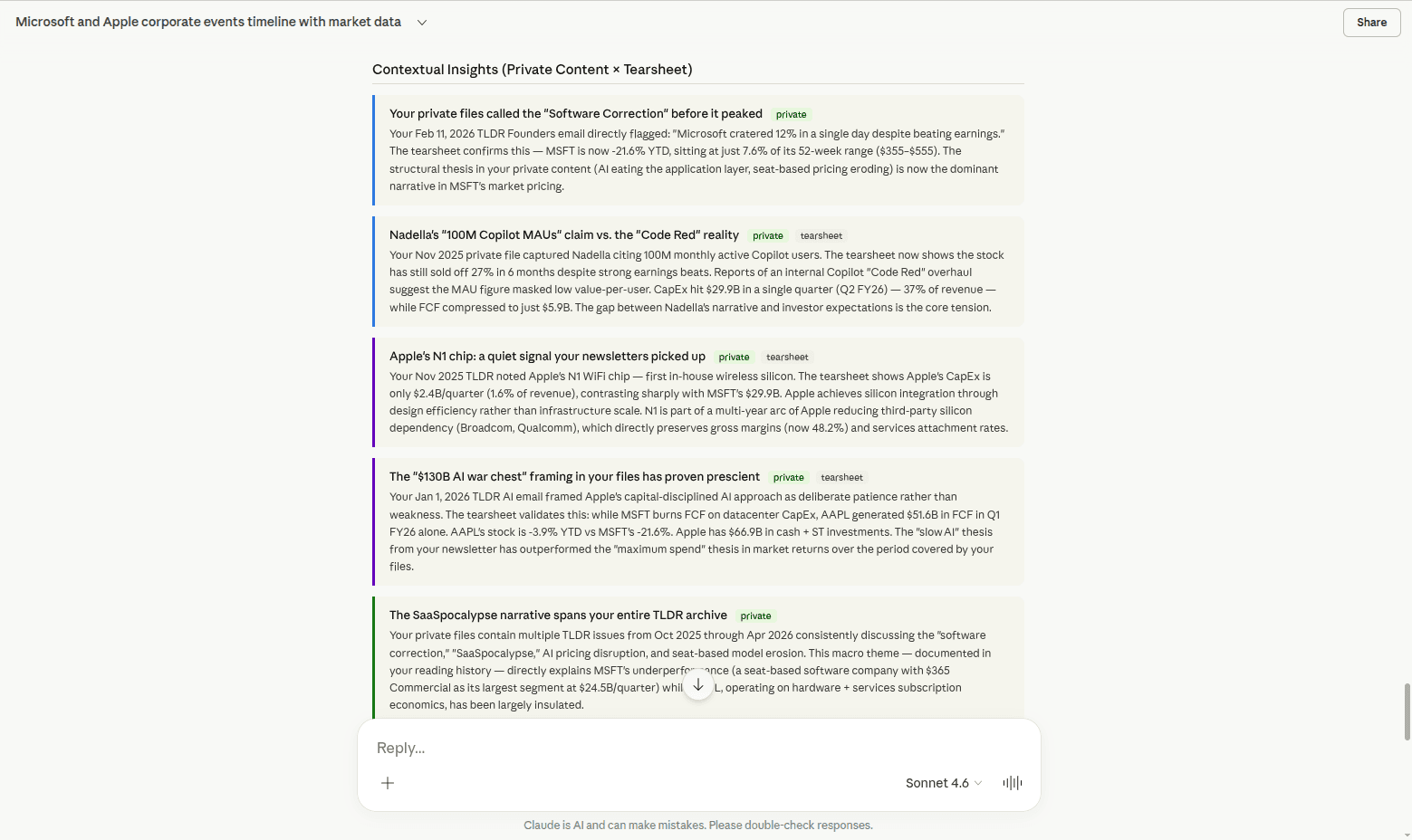
The example below illustrates what becomes possible when your proprietary content is analyzed alongside RavenPack quantitative data. Claude can reason across both layers simultaneously, connecting the dots between company events and market pricing movements. This is just one instance of what combining your internal intelligence with more than 20 years of curated financial content can unlock.
Ready to get started? Set up the Email Inbox Connector at platform.bigdata.com/connectors. To connect Bigdata to Claude, visit bigdata.com/claude.
Somewhere in an analyst’s inbox right now there is a note with a thesis that changes the picture on a position. It arrived this morning, it was skimmed and it won’t be found again.
This is, above all, an infrastructure problem, and almost no one is treating it like one. Firms spend heavily on research platforms, data vendors, and AI tooling. But the highest-signal intelligence (research, analyst commentary, curated newsletters, proprietary client updates) arrives through a channel that was never designed for institutional knowledge: email.
It lands, it gets read, maybe forwarded. Then it disappears into personal inboxes that no search system, no AI agent, and no workflow can see.
Teams compensate with workarounds: copying paragraphs into documents, maintaining personal tagging systems, summarising threads in Slack and Teams. These systems are fragile, as they depend on individuals and don’t scale. And critically, they don’t compound.
The content already exists. The subscriptions are already paid for. The intelligence is already arriving, it just isn’t structurally integrated. That’s the entire bottleneck, so that’s where we started.
What is the Bigdata Inbox Connector?
The Inbox Connector does something deceptively simple: it turns inbound research email into structured, indexed, AI-accessible intelligence. It is the first release in Bigdata’s Connectors Suite, a roadmap of integrations designed to make every high-signal institutional content source pluggable into one system.
Once your emails are processed and indexed, they don’t sit in storage, they become part of your reasoning layer. When you run a search, build a workflow, prompt your research agent, or trigger MCP (Model Context Protocol), your private inbound intelligence is included alongside 30,000+ curated sources powered by RavenPack’s 20+ year archive. The marginal value of every newsletter subscription, feed, and analyst update you already pay for goes up, because the insight compounds instead of disappearing.
Think about what that means structurally. Your proprietary email intelligence, the morning note your broker sent at 7am, the thematic newsletter from that analyst you trust, is now searchable in the same system as millions of financial documents, earnings transcripts, SEC filings, and real-time news. Signals that used to live and die in an inbox now have permanence, structure, and reach.
How to set up your Data Inbox in four steps
Setup requires no IT dependency, no complex integrations, and no change to how you currently receive research.
1. Go to platform.bigdata.com/connectors, click “Create a connector”, and select Email Inbox as your content source. Give it a name and, optionally, a description.
2. Define your approved senders. Enter the email addresses you want whitelisted for processing. This keeps your archive clean and prevents undesired content from being indexed. Add colleagues here if you want to build a shared research environment from the start.
3. Set your access permissions. Decide whether the indexed content is private to you or shared across your organisation. Sharing means content is processed once for the whole team: no duplicate processing, no wasted credits.
4. You’re done. Once the setup is complete, you receive your dedicated Bigdata-managed inbox. Set an auto-forward rule from your existing email client, and from that point on every forwarded email is parsed, extracted, and indexed automatically.
Your AI just got access to your proprietary signal. This is where the impact becomes structural.
Previously, your AI could see web content. Now, with Bigdata, it has access to high-quality assets powered by RavenPack and your proprietary content. That shift reduces blind spots, strengthens signal detection, and accelerates ramp-up on emerging topics. What was once passive becomes active. What was once siloed becomes institutional.
To put this to the test, I set up an auto-forward rule in my email client and pointed my newsletters at my Bigdata inbox. I also bulk-forwarded my historical archive, and the processing pipeline handled all of it automatically.
One detail worth highlighting: we extract EML metadata (senders, recipients, original timestamps) during ingestion, which means your archive is point-in-time accurate. You’re not just getting content, you’re getting content with provenance, which matters the moment you start doing any kind of longitudinal analysis or attribution.
Once processing is complete, you have many ways of interacting with your email content - here’s an exciting one.
Connect Bigdata to Claude so you can chat with you entire inbox and 1 billion financial docs
Bigdata.com is an official MCP connector for Claude. Connect it once through Claude Settings > Connectors, and Claude gains direct access to the full Bigdata intelligence layer, including your indexed email content.
What Claude can draw on once connected:
Over 1 billion financial documents: fundamentals, filings, earnings transcripts, and premium news
Real-time news feeds updated continuously across global markets
20+ years of archive depth, purpose-built for financial search and retrieval
Your proprietary inbound content, indexed and searchable alongside all of the above
Premium source attribution on every claim: named source, date, and URL
In controlled evaluations across 32 reports and 8 standardized financial research tasks, Claude grounded with Bigdata outperformed Claude with standard web search on every metric, with grounding quality seeing the largest single jump: +21 percentage points.
The practical difference for research teams is significant. Instead of context-switching between Claude and your data sources to verify claims, the connector means you stay in the conversation. And now, your forwarded newsletters and broker notes are part of what Claude reasons from.
The example below illustrates what becomes possible when your proprietary content is analyzed alongside RavenPack quantitative data. Claude can reason across both layers simultaneously, connecting the dots between company events and market pricing movements. This is just one instance of what combining your internal intelligence with more than 20 years of curated financial content can unlock.
Ready to get started? Set up the Email Inbox Connector at platform.bigdata.com/connectors. To connect Bigdata to Claude, visit bigdata.com/claude.




Developers
© 2026 Bigdata.com by RavenPack. All rights reserved.
Developers
© 2026 Bigdata.com by RavenPack. All rights reserved.