
ThreewaystoputyouremailarchivetoworkwithBigdata
The Bigdata Inbox Connector turns your inbound emails (broker notes, newsletters, analyst commentary) into structured, AI-searchable intelligence. Read on and discover three ways to leverage your indexed email archive inside Claude, Bigdata Workflows, and Search Grounding.
The Bigdata Inbox Connector turns your inbound emails (broker notes, newsletters, analyst commentary) into structured, AI-searchable intelligence. Read on and discover three ways to leverage your indexed email archive inside Claude, Bigdata Workflows, and Search Grounding.
By
Victor Pimentel Naranjo, Senior Product Manager and Team Lead
·

In our previous deep dive, we detailed how the Bigdata Inbox Connector transforms your inbound stream, broker notes, newsletters, and analyst commentary into structured, AI-searchable intelligence. If you haven’t yet explored that foundational four-step setup, you can catch up on the details here.
This post is about what comes next: what you actually can do with an indexed email archive once it's live. The Inbox Connector isn't a single-use feature, it's a grounding layer that plugs into many usage patterns, workflows and levels of automation. Whether you want to chat with your archive directly, build templated research reports using Skills, or run fully automated daily workflows, the same indexed content is the foundation.
Below, we walk through two use cases in turn, with concrete examples of what the output looks like and when each approach makes the most sense.
How to build an automated Newsletter Intelligence Monitor with Bigdata Workflows
The Bigdata Workflows platform lets you build reproducible, templated research workflows that run automatically, and with the Data Inbox, your proprietary inbound content becomes a first-class input alongside Bigdata's public intelligence layer.
The same agent architecture that Marko Kangrga describes in detail, where specialised sub-agents run in parallel, each with clean isolated context, now has access to your forwarded newsletters and broker notes as source material, not just the 30,000+ curated public sources.
Here's a concrete example of what this looks like when your email content is in the loop: we built a Newsletter Intelligence Monitor workflow that takes a target company as input, queries the indexed email archive, and generates a full structured research report covering:
A timeline of mentions with signal level and sentiment for each entry
Thematic analysis across product strategy, monetisation, competitive landscape, capital activity, and regulatory risk
Cross-segment insights comparing how different voices and organisations frame the company
Meta-narrative evolution: how the story has shifted over the coverage period
Strategic implications and forward-looking indicators to monitor
The workflow is designed to exploit that parallel architecture directly: entity extraction, timeline construction, thematic categorisation, and competitive landscape mapping run concurrently, with early findings feeding downstream synthesis. The result is a report that would take an analyst hours to produce, generated in minutes from content that was already sitting in your inbox.
What makes it compelling beyond the time saving is the enrichment layer. Once the newsletter-sourced intelligence is assembled, the workflow enriches it with Bigdata's broader archive (quantitative tearsheets, sentiment data, market context) and explicitly flags any material developments your email archive missed. You get the private signal and the public intelligence in a single synthesised, cited output. Every claim is traceable. Every source is named.
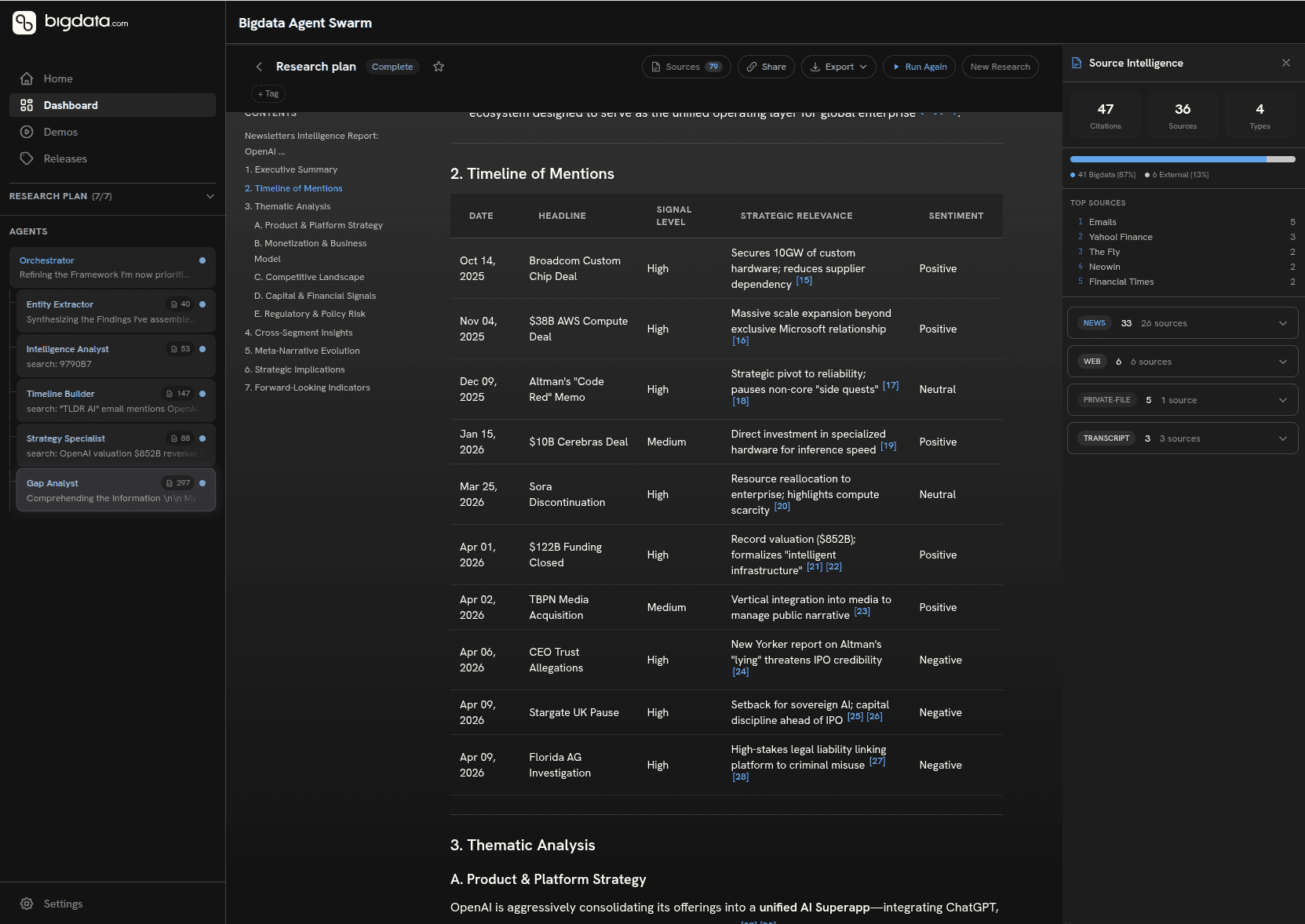
The Bigdata demo apps library contains further examples of agent-based workflows you can explore and adapt for your own research stack.
How to use your indexed email archive as a Search Grounding Layer
Once your email archive is indexed, it becomes a unified grounding layer queryable alongside Bigdata's public intelligence, not a separate silo you have to switch between.
Here's a real example. I started the research workflow by prompting my agent to query my indexed email archive for content originally received from a certain sender, had the model identify the key organisations mentioned across those issues, and generated a self-contained comparative HTML report covering the most relevant events for each, enriched with RavenPack sentiment tearsheet data and forward-looking indicators.
The report you see below was produced entirely from content that had been sitting passively in an inbox.
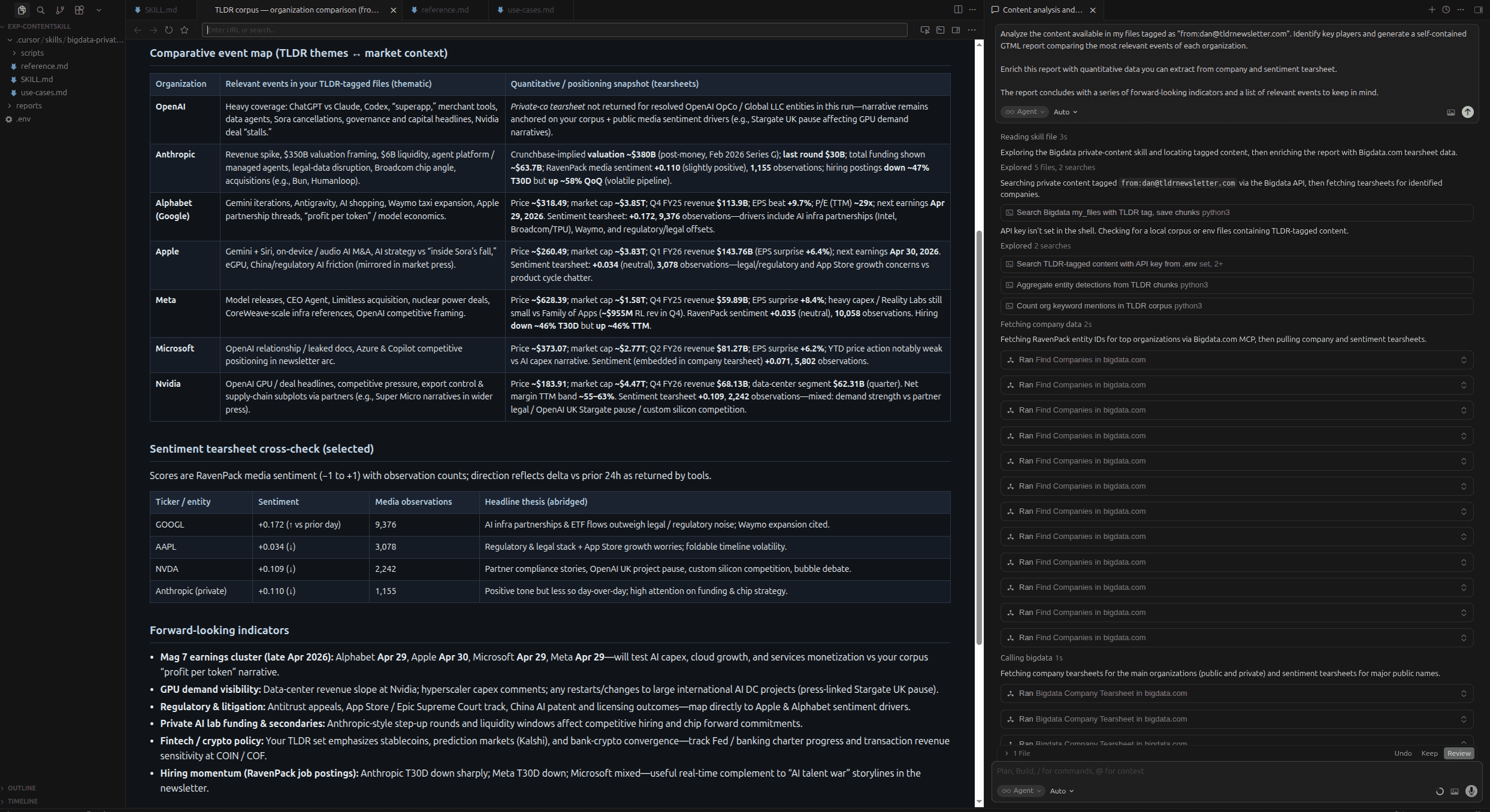
The Bigdata demo apps library contains further examples of agent-based workflows you can explore and adapt for your own research stack.
What made this possible without prompt engineering each time was Skills, structured playbooks that tell the model exactly how to orchestrate the grounding, entity extraction, tearsheet enrichment, and report generation steps. On the right of the screenshot you can see the reasoning layer in action: the skill locating tagged content, fetching RavenPack entity IDs, pulling company and sentiment tearsheets, and assembling the output in sequence.
To understand the details of this implementation, refer to the technical post in our developer portal.
How to automate daily ingest with Claude Cowork and Bigdata
The best research workflow is one that runs without you. Claude Cowork with Bigdata MCP makes that possible right away, without additional technical complexities.
The two patterns above, chatting with your archive in Claude and running on-demand research workflows, require you to initiate them. Claude Cowork removes that constraint.
Claude Cowork is a desktop automation tool that lets non-developers schedule and run agentic workflows on a recurring basis, without writing code. Combined with Bigdata's indexed email archive, it becomes the engine for a daily intelligence briefing that runs whether or not you're at your desk.
A practical setup looks like this: you define a Bigdata Workflow that queries your indexed archive for new content since yesterday, enriches it with RavenPack sentiment data for the companies mentioned, and formats the output as a structured HTML digest. You then use Claude Cowork to schedule that workflow to run each morning at 7am, depositing the report into a shared folder or triggering a Slack notification to your team.
The content driving it was already arriving in your inbox. Cowork and Bigdata MCP just closed the last gap between arrival and action.
For teams already using Claude at scale, this pattern turns the Inbox Connector from a research utility into an always-on intelligence layer. See a similar use case in Bigdata developer blog, where a similar workflow was automated in the context of a portfolio.
How does the data inbox fit into your existing research stack?
We just explored three examples, but the same pattern applies to earnings previews, company briefs, risk assessments, investment memos, and more. The open-source skills on GitHub are a starting point: fork them, adapt them to your sources and your format, and your email archive becomes the proprietary grounding layer underneath. The Bigdata Cookbooks documentation covers the full range of patterns you can build on, and the developer blog, including walkthroughs of Claude Cowork automation, is the place to follow what's coming next.
For a long time, the ceiling for AI-assisted research was determined by what public sources your model could reach. We're shifting that ceiling. The goal now is to make your entire intelligence ecosystem (private and public) available as a single structured layer that your AI can reason from, without friction and without workarounds.
The Email Connector is the first release in a broader Connectors roadmap. Microsoft SharePoint and many more coming soon. The principle is consistent throughout: every high-signal institutional content source (feeds, internal reports, curated newsletters, document repositories) should be pluggable into one system, accessible to your AI the moment it arrives.
The bottleneck was never intelligence. It was the infrastructure around it.
Ready to get started? Set up the Email Inbox Connector at platform.bigdata.com/connectors. To connect Bigdata to Claude, visit bigdata.com/claude. For workflow and automation patterns, explore the Bigdata developer blog.
In our previous deep dive, we detailed how the Bigdata Inbox Connector transforms your inbound stream, broker notes, newsletters, and analyst commentary into structured, AI-searchable intelligence. If you haven’t yet explored that foundational four-step setup, you can catch up on the details here.
This post is about what comes next: what you actually can do with an indexed email archive once it's live. The Inbox Connector isn't a single-use feature, it's a grounding layer that plugs into many usage patterns, workflows and levels of automation. Whether you want to chat with your archive directly, build templated research reports using Skills, or run fully automated daily workflows, the same indexed content is the foundation.
Below, we walk through two use cases in turn, with concrete examples of what the output looks like and when each approach makes the most sense.
How to build an automated Newsletter Intelligence Monitor with Bigdata Workflows
The Bigdata Workflows platform lets you build reproducible, templated research workflows that run automatically, and with the Data Inbox, your proprietary inbound content becomes a first-class input alongside Bigdata's public intelligence layer.
The same agent architecture that Marko Kangrga describes in detail, where specialised sub-agents run in parallel, each with clean isolated context, now has access to your forwarded newsletters and broker notes as source material, not just the 30,000+ curated public sources.
Here's a concrete example of what this looks like when your email content is in the loop: we built a Newsletter Intelligence Monitor workflow that takes a target company as input, queries the indexed email archive, and generates a full structured research report covering:
A timeline of mentions with signal level and sentiment for each entry
Thematic analysis across product strategy, monetisation, competitive landscape, capital activity, and regulatory risk
Cross-segment insights comparing how different voices and organisations frame the company
Meta-narrative evolution: how the story has shifted over the coverage period
Strategic implications and forward-looking indicators to monitor
The workflow is designed to exploit that parallel architecture directly: entity extraction, timeline construction, thematic categorisation, and competitive landscape mapping run concurrently, with early findings feeding downstream synthesis. The result is a report that would take an analyst hours to produce, generated in minutes from content that was already sitting in your inbox.
What makes it compelling beyond the time saving is the enrichment layer. Once the newsletter-sourced intelligence is assembled, the workflow enriches it with Bigdata's broader archive (quantitative tearsheets, sentiment data, market context) and explicitly flags any material developments your email archive missed. You get the private signal and the public intelligence in a single synthesised, cited output. Every claim is traceable. Every source is named.
The Bigdata demo apps library contains further examples of agent-based workflows you can explore and adapt for your own research stack.
How to use your indexed email archive as a Search Grounding Layer
Once your email archive is indexed, it becomes a unified grounding layer queryable alongside Bigdata's public intelligence, not a separate silo you have to switch between.
Here's a real example. I started the research workflow by prompting my agent to query my indexed email archive for content originally received from a certain sender, had the model identify the key organisations mentioned across those issues, and generated a self-contained comparative HTML report covering the most relevant events for each, enriched with RavenPack sentiment tearsheet data and forward-looking indicators.
The report you see below was produced entirely from content that had been sitting passively in an inbox.
The Bigdata demo apps library contains further examples of agent-based workflows you can explore and adapt for your own research stack.
What made this possible without prompt engineering each time was Skills, structured playbooks that tell the model exactly how to orchestrate the grounding, entity extraction, tearsheet enrichment, and report generation steps. On the right of the screenshot you can see the reasoning layer in action: the skill locating tagged content, fetching RavenPack entity IDs, pulling company and sentiment tearsheets, and assembling the output in sequence.
To understand the details of this implementation, refer to the technical post in our developer portal.
How to automate daily ingest with Claude Cowork and Bigdata
The best research workflow is one that runs without you. Claude Cowork with Bigdata MCP makes that possible right away, without additional technical complexities.
The two patterns above, chatting with your archive in Claude and running on-demand research workflows, require you to initiate them. Claude Cowork removes that constraint.
Claude Cowork is a desktop automation tool that lets non-developers schedule and run agentic workflows on a recurring basis, without writing code. Combined with Bigdata's indexed email archive, it becomes the engine for a daily intelligence briefing that runs whether or not you're at your desk.
A practical setup looks like this: you define a Bigdata Workflow that queries your indexed archive for new content since yesterday, enriches it with RavenPack sentiment data for the companies mentioned, and formats the output as a structured HTML digest. You then use Claude Cowork to schedule that workflow to run each morning at 7am, depositing the report into a shared folder or triggering a Slack notification to your team.
The content driving it was already arriving in your inbox. Cowork and Bigdata MCP just closed the last gap between arrival and action.
For teams already using Claude at scale, this pattern turns the Inbox Connector from a research utility into an always-on intelligence layer. See a similar use case in Bigdata developer blog, where a similar workflow was automated in the context of a portfolio.
How does the data inbox fit into your existing research stack?
We just explored three examples, but the same pattern applies to earnings previews, company briefs, risk assessments, investment memos, and more. The open-source skills on GitHub are a starting point: fork them, adapt them to your sources and your format, and your email archive becomes the proprietary grounding layer underneath. The Bigdata Cookbooks documentation covers the full range of patterns you can build on, and the developer blog, including walkthroughs of Claude Cowork automation, is the place to follow what's coming next.
For a long time, the ceiling for AI-assisted research was determined by what public sources your model could reach. We're shifting that ceiling. The goal now is to make your entire intelligence ecosystem (private and public) available as a single structured layer that your AI can reason from, without friction and without workarounds.
The Email Connector is the first release in a broader Connectors roadmap. Microsoft SharePoint and many more coming soon. The principle is consistent throughout: every high-signal institutional content source (feeds, internal reports, curated newsletters, document repositories) should be pluggable into one system, accessible to your AI the moment it arrives.
The bottleneck was never intelligence. It was the infrastructure around it.
Ready to get started? Set up the Email Inbox Connector at platform.bigdata.com/connectors. To connect Bigdata to Claude, visit bigdata.com/claude. For workflow and automation patterns, explore the Bigdata developer blog.



Developers
© 2026 Bigdata.com by RavenPack. All rights reserved.
Developers
© 2026 Bigdata.com by RavenPack. All rights reserved.