
HowtoturnyourSharePointintoAI-searchableinstitutionalintelligencewithBigdata
The SharePoint Connector is the second release in Bigdata's Connectors Suite, a set of integrations designed to make every high-signal institutional content source pluggable into one unified intelligence layer.
The SharePoint Connector is the second release in Bigdata's Connectors Suite, a set of integrations designed to make every high-signal institutional content source pluggable into one unified intelligence layer.
By
Victor Pimentel Naranjo, Senior Product Manager and Team Lead
·

This is the second release in Bigdata’s Connectors Suite. If you missed the first, read how we solved the email infrastructure problem here.
The other place your intelligence dies
As part of our first release we addressed the email inbox problem. That place, land of no-one where your gold insights tend to be lost in between noise.
But there’s a second place where institutional knowledge accumulates and becomes difficult to manage and use in your daily research workflows: SharePoint.
Most research teams have an enterprise cloud storage space. Files are there, somewhere. The folder structure made sense to whoever built it. Search returns ten things when you want one, or nothing when you need something. And crucially, the reasoning layer is hard to integrate and make it work with trust.
Email intelligence is ephemeral by nature: it arrives, gets read, and disappears. SharePoint is the opposite failure mode. The content was meant to be preserved. Reports were filed, decks were uploaded, memos were stored. The intent was institutional memory. What you got instead was a document graveyard with a broken search bar.
That’s the problem the Bigdata SharePoint Connector solves.
What is the Bigdata SharePoint Connector?
The SharePoint Connector is the second release in Bigdata’s Connectors Suite, a set of integrations designed to make every high-signal institutional content source pluggable into one unified intelligence layer.
It does for your document repositories what the Email Connector did for your inboxes: it takes content that was already there, already paid for, already valuable in theory, and makes it structurally accessible to Bigdata.

Once your SharePoint library is indexed, they don’t sit in storage, they become part of your reasoning layer. Internal research reports, investment memos, board presentations, compliance documentation, all of it becomes searchable alongside Bigdata’s 1 billion+ public financial documents, in the same system, through the same interface.
How to set up the SharePoint Connector in 4 steps
Setup requires no IT dependency, no complex integrations, and no changes to how your team currently stores or organises documents.
1. Go to platform.bigdata.com/connectors, click “Create a connector”, and select SharePoint as your content source. Give it a name and an optional description.
2. Authenticate with your Microsoft 365 account. You’ll be asked to grant read permissions to the SharePoint libraries you want indexed. You control the scope of what you want to sync.
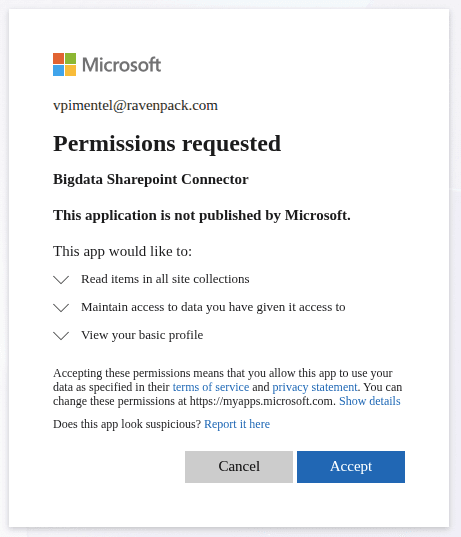
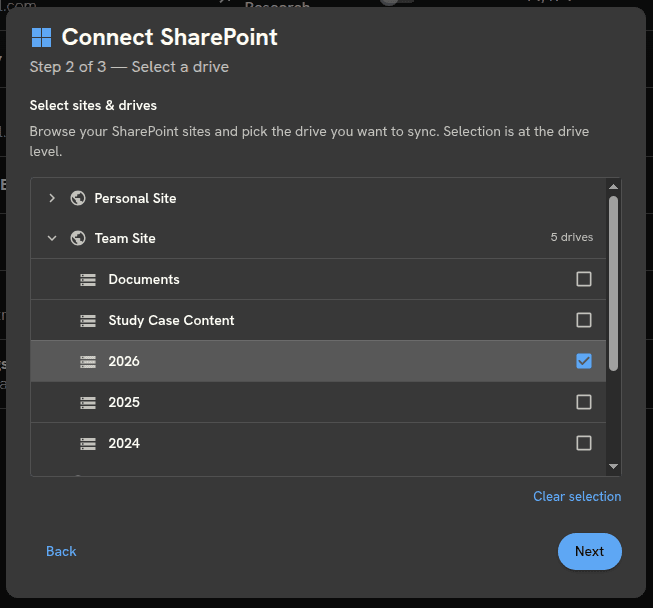
3. Select the libraries you want to connect to.
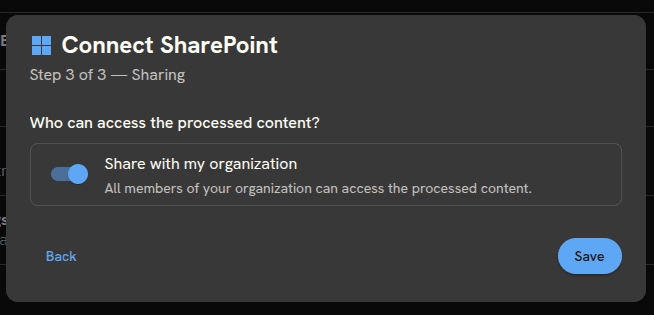
4. Set your access permissions. Decide whether the indexed content is private to you or available organisation-wide. The same logic as the Email Connector applies: shared indexing means documents are processed once for the whole team, no duplicate processing, no wasted credits.
5. Done. The connector indexes your selected libraries and stays in sync automatically. The integration uses a push-based architecture: when a file is added or updated in SharePoint, our system is notified instantly and syncs only what changed, not the entire drive. In practice, most documents appear in your intelligence layer within minutes of being uploaded. During large batch imports or initial indexing, processing may take longer, but there’s no manual refresh, no scheduled job to configure, and nothing to maintain.
Your AI just got access to your institutional archive
Previously, Bigdata was able to see public web content and, if you connected the Email Connector, your inbound research. Now it can see the parts of your organisational archive you choose to make available: internal research reports, investment memos, board presentations, compliance documentation. All of it is searchable alongside Bigdata’s 1 billion+ financial documents collected by RavenPack, in the same system, through the same interface. Access is always scoped to what you explicitly configure, respects your existing SharePoint permissions, and is governed by Bigdata’s enterprise security and privacy standards throughout.
When an analyst asks “What was our thesis on this topic twelve months ago?”, the answer isn’t in any public database. It’s in a SharePoint folder that no one has opened since the deck was filed. With the connector active, that question gets answered, with the source document cited, the date attributed, and the specific passage surfaced.
Bigdata + SharePoint vs. Copilot + SharePoint: Comparative Evaluation
Microsoft 365 users already have Copilot. It’s embedded in the suite, it connects to SharePoint, and it answers questions. So why build something different? Because there is a meaningful gap between “can access SharePoint” and “can reason across your entire institutional archive”. That gap is what this section is about.
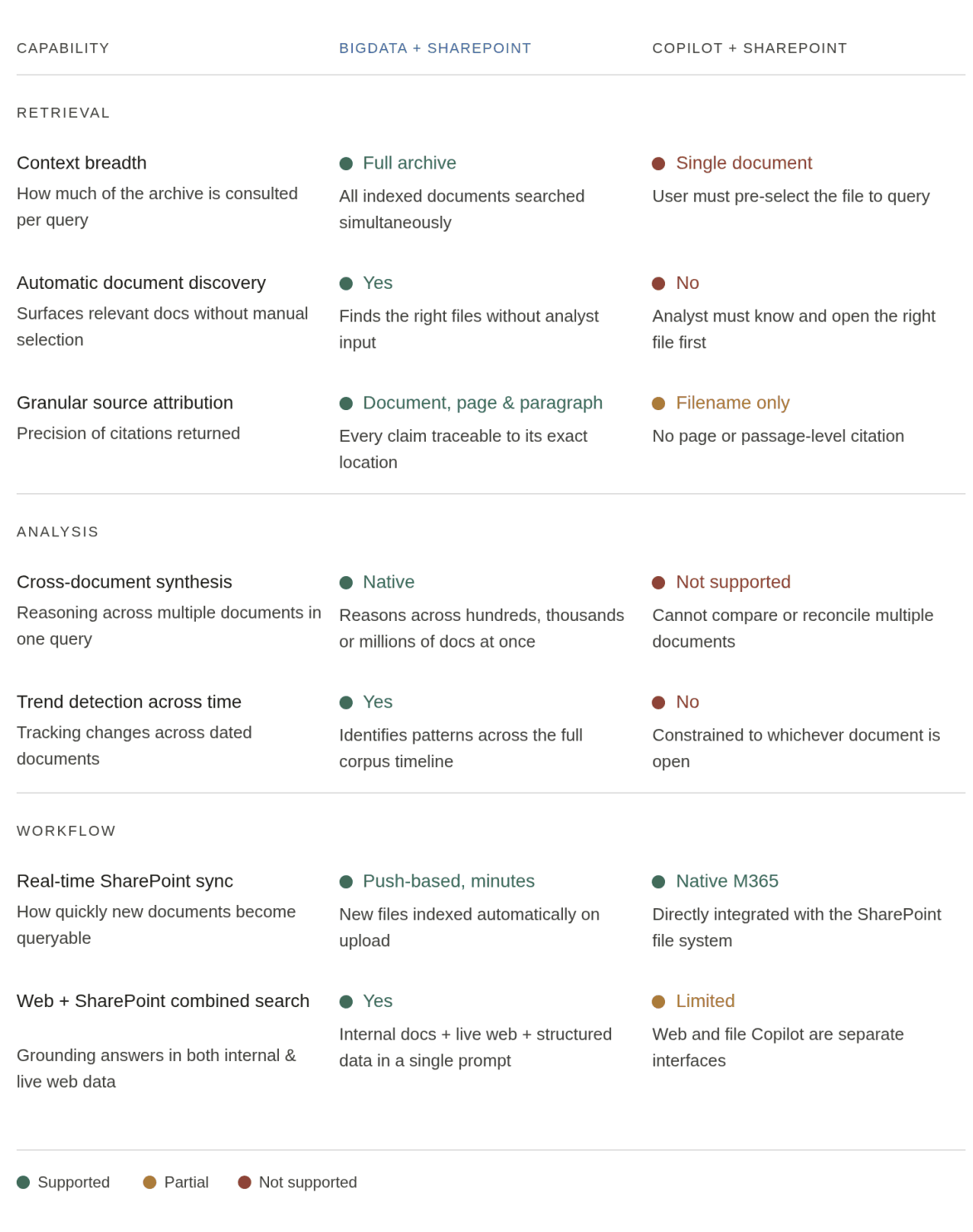
The architectural difference matters more than people expect. Copilot’s SharePoint integration scopes context to a single document or a narrow file selection you identify yourself. That model works for drafting emails or summarising a memo you already found. It does not work for institutional research, where the answer is distributed across dozens of documents you have not yet identified, and where the provenance of every claim needs to be traceable. Bigdata operates across your entire indexed archive simultaneously, surfaces the most relevant passages, and attributes every finding to its source document, page, and paragraph.
Find major differences between Bigdata and Copilot when accessing SharePoint content:
But assertions are not evidence. We ran a structured benchmark to quantify the difference. We applied the same eight-dimension evaluation framework used in Bigdata’s published comparative evaluations to a new context: institutional knowledge retrieval over a private SharePoint corpus.
The thesis: context breadth is the primary driver of output quality in institutional research.
Study design
We constructed a controlled SharePoint corpus of 154 official research documents covering the top 10 S&P 500 organisations by market capitalisation, spanning January 2025 to April 2026. The corpus was loaded identically into both systems. Neither had access to data outside what was indexed.
We issued 250 prompts across two categories. Analytical prompts test reasoning across multiple documents and time periods. Some prompts are more analytical:
How could adverse global economic conditions affect Broadcom’s business, financial condition, liquidity, and ability to forecast results?
Others are more factual oriented, to test precision and traceability:
What is the value of the acquisition deal between Google and Wiz?
Each prompt was run across four configurations:
Bigdata (BD in the infographics) with access to SharePoint content only
Bigdata with access to SharePoint and RavenPack content
Copilot with SharePoint content gathered by Bigdata search API only
Copilot with SharePoint and web content (no RavenPack).
All responses were then evaluated independently using Bigdata’s eight-dimension scoring framework.
The evaluation framework scores each response across eight dimensions on a 1–10 scale: 1) Factual accuracy of the data retrieved; 2) Source quality and attribution, are claims tied to the original document and passage? 3) Completeness and coverage, did the response draw on all relevant documents in the corpus? 4) Analytical depth and insight, did the system derive meaning from the data, not just surface it? 5) Structure and readability; 6) Evidence coverage, was the full body of supporting material consulted? 7) Timeliness and recency, did the response reflect the most current documents in the archive?; and 8) Professional polish and trust signals. Each dimension is scored independently, then averaged to produce a configuration-level score.
Conclusions
The two Bigdata configurations, SharePoint-only and SharePoint plus external content, outperformed both Copilot configurations on seven of the eight evaluation dimensions. The results tell a consistent story.
Bigdata + SharePoint leads the overall ranking with a mean score of 8.49 across eight dimensions, but the results are more interesting than a simple winner-takes-all outcome.
The largest gap between any two configurations is in analytical depth and insight, BD + SharePoint scores 7.00 against Copilot’s 5.00. This is the dimension most directly tied to context breadth: questions that require synthesising trends across multiple documents, or reconciling positions from different reports, simply cannot be answered well when the system is constrained.
Completeness and evidence coverage tell a different story. Here, Bigdata.com standalone leads (9.40 and 8.00 respectively), slightly ahead of Bigdata + SharePoint. This reflects the depth of Bigdata’s public financial document layer; when your question touches both your private archive and public filings, the combined surface area matters.
One result worth highlighting: Copilot + Bigdata Search (7.88 average) outperforms plain Copilot (7.31) on every single dimension. The Bigdata data layer improves Copilot too, the gap isn’t about the interface, it’s about what the system can see.
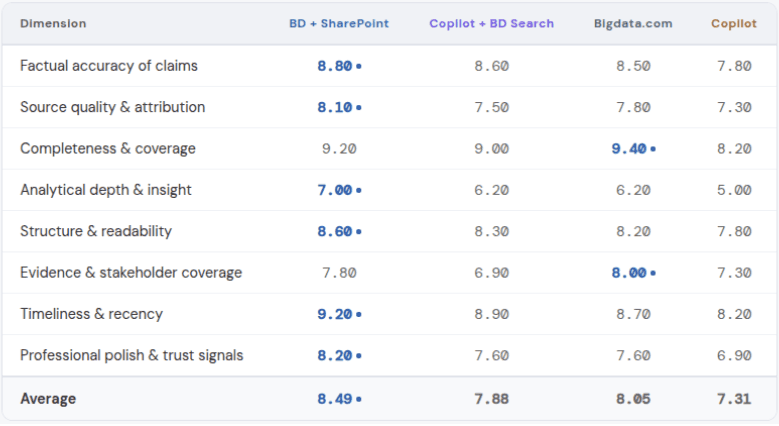
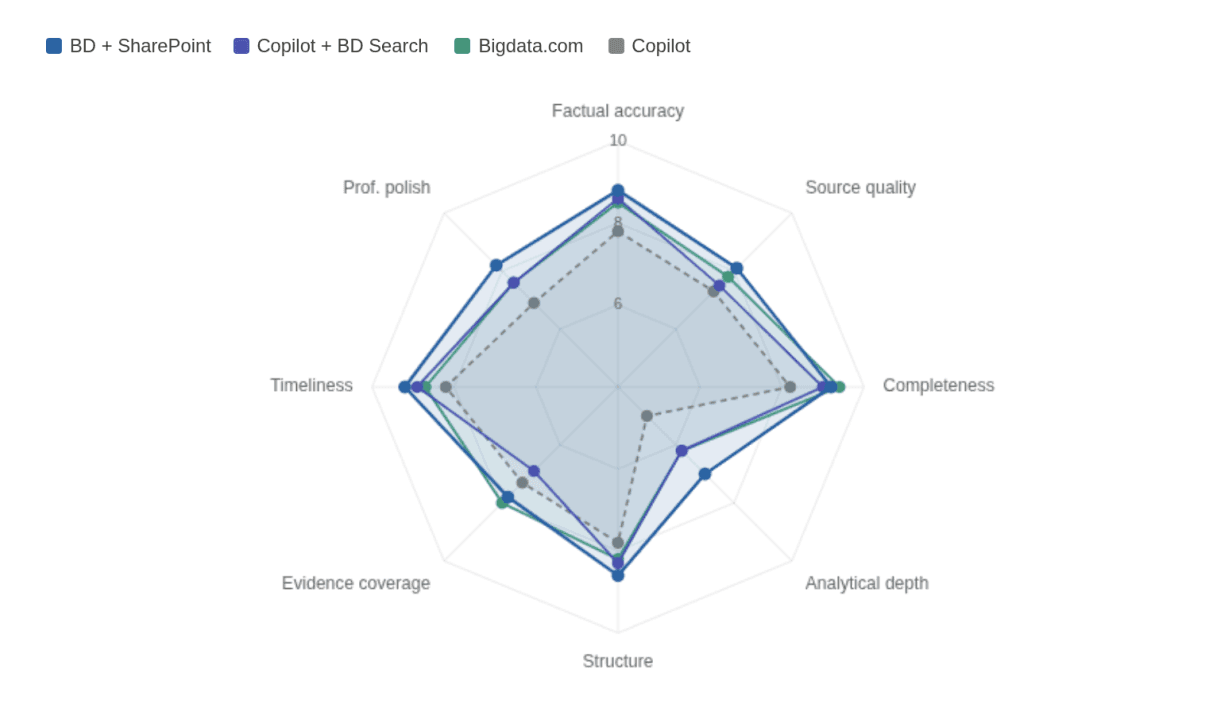
Mean scores across eight evaluation dimensions.
The practical takeaway is straightforward. If your workflows require reasoning across a private document archive, Bigdata + SharePoint is the highest-performing configuration. If your questions are primarily grounded in public financial data, Bigdata.com standalone holds its own. Either way, grounding your queries in Bigdata’s intelligence layer produces materially better outputs than relying on Copilot’s native SharePoint access alone.
What can you do with an indexed SharePoint archive?
The short answer is: the same things you can already do with your Bigdata set-up; and more, because the material is richer. The SharePoint Connector isn’t a single-use feature; it’s a grounding layer that plugs into many usage patterns, workflows, and levels of automation.
In practice, that means you can chat directly with your internal document archive through Bigdata API or Bigdata MCP, asking research questions that draw simultaneously on your private repositories and Bigdata’s 1B+ public intelligence layer, with every claim attributed to its source. You can build automated Bigdata Workflows that open with a SharePoint query, enrich findings with RavenPack sentiment data, and output a structured research brief on a schedule, without analyst intervention.
If you want to see these patterns in action on private content-sourced content first, the following post walks through each one in detail but in the case of Bigdata Email Inbox Connector. Of course, the same applies to SharePoint Connectors.
The goal is to make your entire intelligence ecosystem, private and public, available as a single structured layer that your AI can reason from, without friction and without workarounds. The bottleneck was never intelligence. It was the infrastructure around it.
–
Ready to connect your SharePoint? Set up the SharePoint Connector at platform.bigdata.com/connectors, To connect Bigdata to Claude, visit bigdata.com/claude. For workflow and automation patterns, explore the Bigdata developer blog.
This is the second release in Bigdata’s Connectors Suite. If you missed the first, read how we solved the email infrastructure problem here.
The other place your intelligence dies
As part of our first release we addressed the email inbox problem. That place, land of no-one where your gold insights tend to be lost in between noise.
But there’s a second place where institutional knowledge accumulates and becomes difficult to manage and use in your daily research workflows: SharePoint.
Most research teams have an enterprise cloud storage space. Files are there, somewhere. The folder structure made sense to whoever built it. Search returns ten things when you want one, or nothing when you need something. And crucially, the reasoning layer is hard to integrate and make it work with trust.
Email intelligence is ephemeral by nature: it arrives, gets read, and disappears. SharePoint is the opposite failure mode. The content was meant to be preserved. Reports were filed, decks were uploaded, memos were stored. The intent was institutional memory. What you got instead was a document graveyard with a broken search bar.
That’s the problem the Bigdata SharePoint Connector solves.
What is the Bigdata SharePoint Connector?
The SharePoint Connector is the second release in Bigdata’s Connectors Suite, a set of integrations designed to make every high-signal institutional content source pluggable into one unified intelligence layer.
It does for your document repositories what the Email Connector did for your inboxes: it takes content that was already there, already paid for, already valuable in theory, and makes it structurally accessible to Bigdata.
Once your SharePoint library is indexed, they don’t sit in storage, they become part of your reasoning layer. Internal research reports, investment memos, board presentations, compliance documentation, all of it becomes searchable alongside Bigdata’s 1 billion+ public financial documents, in the same system, through the same interface.
How to set up the SharePoint Connector in 4 steps
Setup requires no IT dependency, no complex integrations, and no changes to how your team currently stores or organises documents.
1. Go to platform.bigdata.com/connectors, click “Create a connector”, and select SharePoint as your content source. Give it a name and an optional description.
2. Authenticate with your Microsoft 365 account. You’ll be asked to grant read permissions to the SharePoint libraries you want indexed. You control the scope of what you want to sync.
3. Select the libraries you want to connect to.
4. Set your access permissions. Decide whether the indexed content is private to you or available organisation-wide. The same logic as the Email Connector applies: shared indexing means documents are processed once for the whole team, no duplicate processing, no wasted credits.
5. Done. The connector indexes your selected libraries and stays in sync automatically. The integration uses a push-based architecture: when a file is added or updated in SharePoint, our system is notified instantly and syncs only what changed, not the entire drive. In practice, most documents appear in your intelligence layer within minutes of being uploaded. During large batch imports or initial indexing, processing may take longer, but there’s no manual refresh, no scheduled job to configure, and nothing to maintain.
Your AI just got access to your institutional archive
Previously, Bigdata was able to see public web content and, if you connected the Email Connector, your inbound research. Now it can see the parts of your organisational archive you choose to make available: internal research reports, investment memos, board presentations, compliance documentation. All of it is searchable alongside Bigdata’s 1 billion+ financial documents collected by RavenPack, in the same system, through the same interface. Access is always scoped to what you explicitly configure, respects your existing SharePoint permissions, and is governed by Bigdata’s enterprise security and privacy standards throughout.
When an analyst asks “What was our thesis on this topic twelve months ago?”, the answer isn’t in any public database. It’s in a SharePoint folder that no one has opened since the deck was filed. With the connector active, that question gets answered, with the source document cited, the date attributed, and the specific passage surfaced.
Bigdata + SharePoint vs. Copilot + SharePoint: Comparative Evaluation
Microsoft 365 users already have Copilot. It’s embedded in the suite, it connects to SharePoint, and it answers questions. So why build something different? Because there is a meaningful gap between “can access SharePoint” and “can reason across your entire institutional archive”. That gap is what this section is about.
The architectural difference matters more than people expect. Copilot’s SharePoint integration scopes context to a single document or a narrow file selection you identify yourself. That model works for drafting emails or summarising a memo you already found. It does not work for institutional research, where the answer is distributed across dozens of documents you have not yet identified, and where the provenance of every claim needs to be traceable. Bigdata operates across your entire indexed archive simultaneously, surfaces the most relevant passages, and attributes every finding to its source document, page, and paragraph.
Find major differences between Bigdata and Copilot when accessing SharePoint content:
But assertions are not evidence. We ran a structured benchmark to quantify the difference. We applied the same eight-dimension evaluation framework used in Bigdata’s published comparative evaluations to a new context: institutional knowledge retrieval over a private SharePoint corpus.
The thesis: context breadth is the primary driver of output quality in institutional research.
Study design
We constructed a controlled SharePoint corpus of 154 official research documents covering the top 10 S&P 500 organisations by market capitalisation, spanning January 2025 to April 2026. The corpus was loaded identically into both systems. Neither had access to data outside what was indexed.
We issued 250 prompts across two categories. Analytical prompts test reasoning across multiple documents and time periods. Some prompts are more analytical:
How could adverse global economic conditions affect Broadcom’s business, financial condition, liquidity, and ability to forecast results?
Others are more factual oriented, to test precision and traceability:
What is the value of the acquisition deal between Google and Wiz?
Each prompt was run across four configurations:
Bigdata (BD in the infographics) with access to SharePoint content only
Bigdata with access to SharePoint and RavenPack content
Copilot with SharePoint content gathered by Bigdata search API only
Copilot with SharePoint and web content (no RavenPack).
All responses were then evaluated independently using Bigdata’s eight-dimension scoring framework.
The evaluation framework scores each response across eight dimensions on a 1–10 scale: 1) Factual accuracy of the data retrieved; 2) Source quality and attribution, are claims tied to the original document and passage? 3) Completeness and coverage, did the response draw on all relevant documents in the corpus? 4) Analytical depth and insight, did the system derive meaning from the data, not just surface it? 5) Structure and readability; 6) Evidence coverage, was the full body of supporting material consulted? 7) Timeliness and recency, did the response reflect the most current documents in the archive?; and 8) Professional polish and trust signals. Each dimension is scored independently, then averaged to produce a configuration-level score.
Conclusions
The two Bigdata configurations, SharePoint-only and SharePoint plus external content, outperformed both Copilot configurations on seven of the eight evaluation dimensions. The results tell a consistent story.
Bigdata + SharePoint leads the overall ranking with a mean score of 8.49 across eight dimensions, but the results are more interesting than a simple winner-takes-all outcome.
The largest gap between any two configurations is in analytical depth and insight, BD + SharePoint scores 7.00 against Copilot’s 5.00. This is the dimension most directly tied to context breadth: questions that require synthesising trends across multiple documents, or reconciling positions from different reports, simply cannot be answered well when the system is constrained.
Completeness and evidence coverage tell a different story. Here, Bigdata.com standalone leads (9.40 and 8.00 respectively), slightly ahead of Bigdata + SharePoint. This reflects the depth of Bigdata’s public financial document layer; when your question touches both your private archive and public filings, the combined surface area matters.
One result worth highlighting: Copilot + Bigdata Search (7.88 average) outperforms plain Copilot (7.31) on every single dimension. The Bigdata data layer improves Copilot too, the gap isn’t about the interface, it’s about what the system can see.
Mean scores across eight evaluation dimensions.
The practical takeaway is straightforward. If your workflows require reasoning across a private document archive, Bigdata + SharePoint is the highest-performing configuration. If your questions are primarily grounded in public financial data, Bigdata.com standalone holds its own. Either way, grounding your queries in Bigdata’s intelligence layer produces materially better outputs than relying on Copilot’s native SharePoint access alone.
What can you do with an indexed SharePoint archive?
The short answer is: the same things you can already do with your Bigdata set-up; and more, because the material is richer. The SharePoint Connector isn’t a single-use feature; it’s a grounding layer that plugs into many usage patterns, workflows, and levels of automation.
In practice, that means you can chat directly with your internal document archive through Bigdata API or Bigdata MCP, asking research questions that draw simultaneously on your private repositories and Bigdata’s 1B+ public intelligence layer, with every claim attributed to its source. You can build automated Bigdata Workflows that open with a SharePoint query, enrich findings with RavenPack sentiment data, and output a structured research brief on a schedule, without analyst intervention.
If you want to see these patterns in action on private content-sourced content first, the following post walks through each one in detail but in the case of Bigdata Email Inbox Connector. Of course, the same applies to SharePoint Connectors.
The goal is to make your entire intelligence ecosystem, private and public, available as a single structured layer that your AI can reason from, without friction and without workarounds. The bottleneck was never intelligence. It was the infrastructure around it.
–
Ready to connect your SharePoint? Set up the SharePoint Connector at platform.bigdata.com/connectors, To connect Bigdata to Claude, visit bigdata.com/claude. For workflow and automation patterns, explore the Bigdata developer blog.



Developers
© 2026 Bigdata.com by RavenPack. All rights reserved.
Developers
© 2026 Bigdata.com by RavenPack. All rights reserved.